本地Web应用-实现文件/目录选择器-获取文件完整路径
有时候我们需要需要实现通过浏览器选择文件获取文件信息而不上传文件, 这个时候JavaScript的内置api就足以完成需求. 但是,如果我们需要获取到文件的完整路径, 那么对不起, 由于为了安全避免xss攻击, 现代的浏览器仅能获取到一个虚假的路径或者根本无法获取(IE10之前的浏览器可以获取到完整路径).
如果我们是本地Web应用, 这个问题就可以得到解决.解决方案有Electron封装,或者提供一个运行在本地的Agent用于获取文件路径,再由前端选择文件提交至 Agent或后端, 如果选择前者,再由Agent将路径间接传递至后端.
本文分享使用Go作为后端,Vue作为前端的,一起运行在本地的Web应用解决方案.
(附完整代码)
效果图
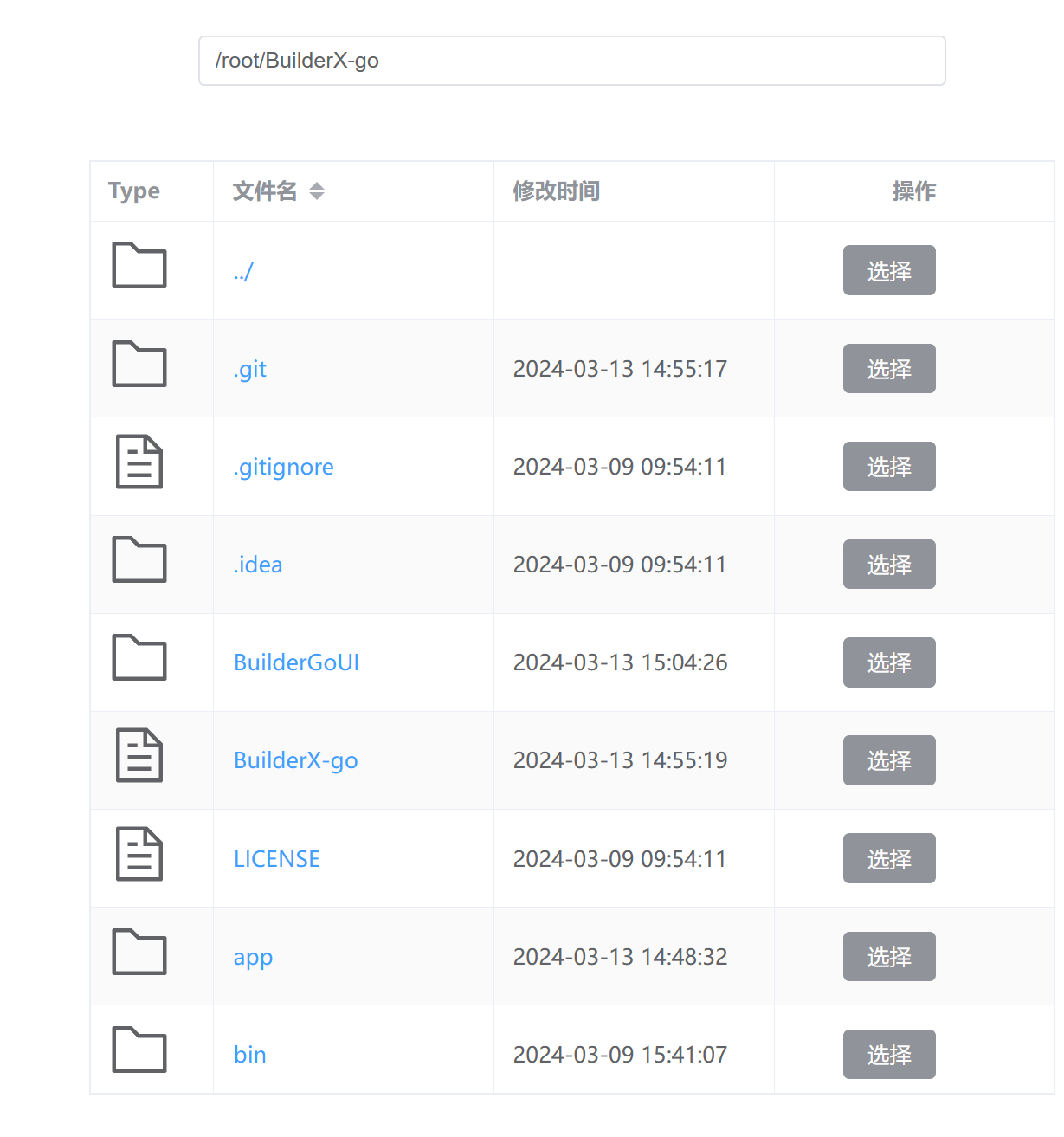
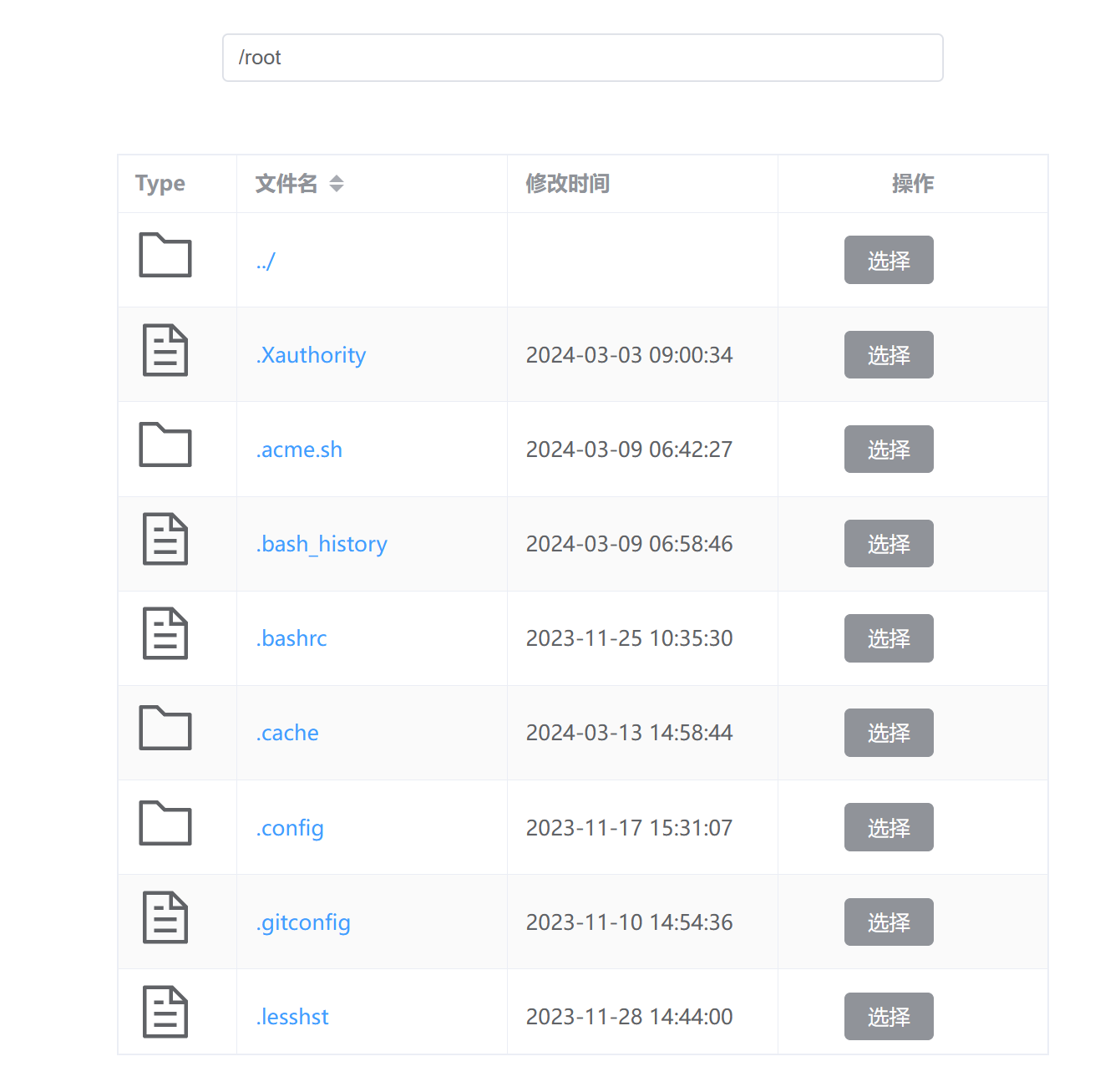
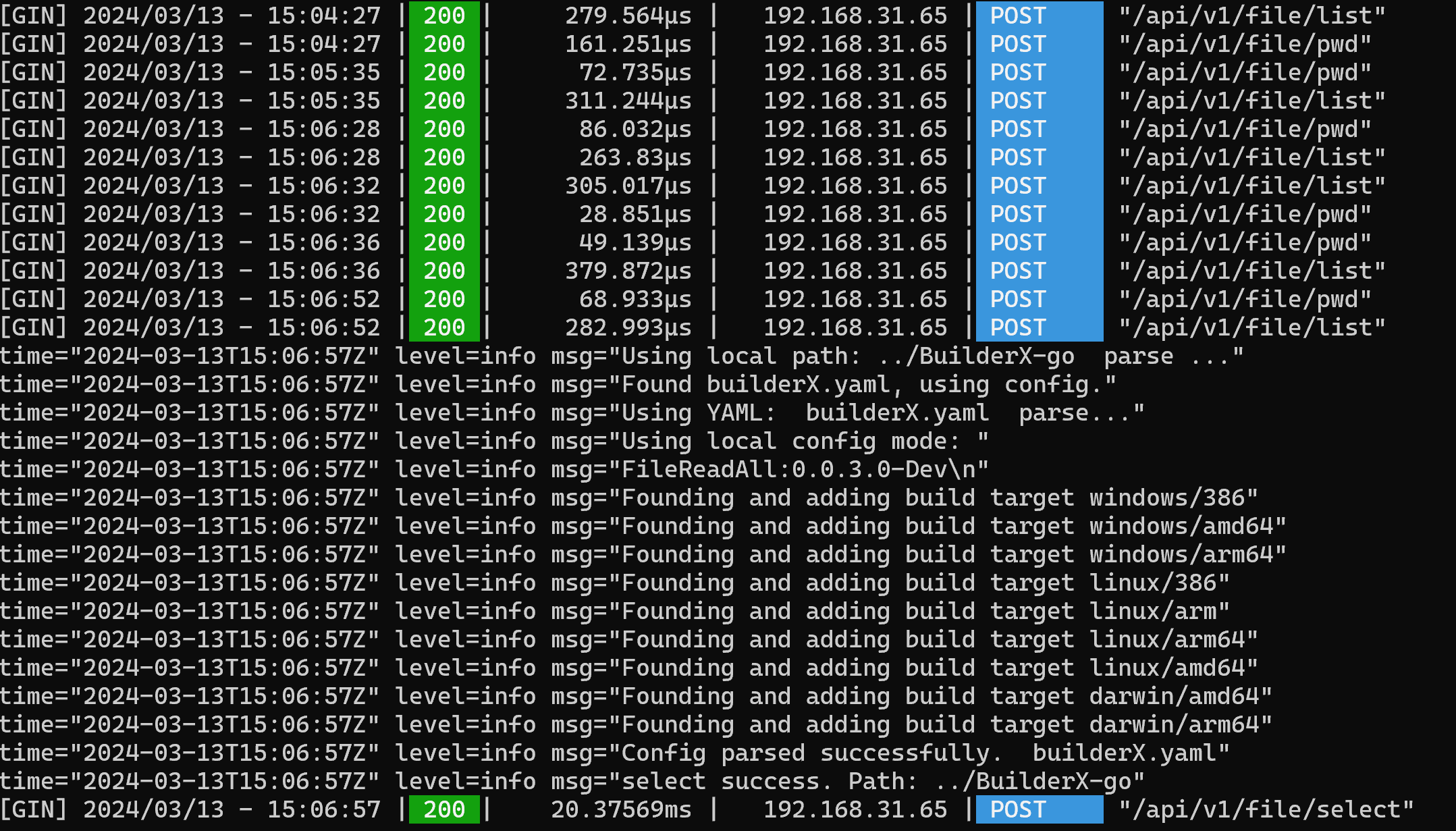
我们的需求
后端需要获取到选择路径=>通过图形化/命令行获取
图形化获取=>需要选择实现图形化的方案=>Web方案
Web需要获取本地路径=>通过Api获取=>方案行不通X 通过后端返回路径供前端选择,再由前端选择后提交回后端:行得通√
后端设计
数据类型定义
在前后端交互过程中,我们需要规定一个表单格式
前端向后端发出获取目录文件列表的请求体
{
    id:"xxx",
    nowDir:"./",
}
|
后端向前端返回的目录格式
{
    File:[name:"",time:"",isDir:false],
  allowBack:true,
  status:"selectSuccess/ok/fail",
}
|
代码
Golang-Gin
路由路径
api/v1/file/xxx
Gin初始化和中间件设置
var RouterGroupApp []CommonRouter
func InitRouter() {
global.Router = gin.Default()
global.Router.MaxMultipartMemory = 50 << 20
global.Router.Use( )
static()
RouterGroupApp = commonGroups()
PrivateGroup := global.Router.Group("/api/v1")
for _, router := range RouterGroupApp {
router.InitRouter(PrivateGroup)
}
err := global.Router.Run(":18088")
if err != nil {
logrus.Errorln("Web Server start error, error Info is: ", err)
logrus.Info("Web Server will not start, please check the configuration or error Info.")
return
}
}
func static() {
global.Router.Static("/static", "./res")
global.Router.Static("/assets", "./res")
global.Router.Static("/index.html", "./index.html")
global.Router.GET("/favicon.ico", func(context *gin.Context) {
context.Redirect(302, "/static/favicon.ico")
})
global.Router.LoadHTMLGlob("res/html/*.html")
global.Router.NoRoute(func(c *gin.Context) {
c.HTML(http.StatusOK, "404.html", gin.H{
"title": "404",
})
})
}
|
通过实现接口和对接口的调用快速初始化各路由组
type CommonRouter interface {
  InitRouter(Router *gin.RouterGroup)
}

func commonGroups() []CommonRouter {
  return []CommonRouter{
    &FileRouter{},
  }
}
|
实现文件路由组功能:
type FileRouter struct{}

func (s *FileRouter) InitRouter(Router *gin.RouterGroup) {
  fileRouter := Router.Group("file")
  fileApi := v1.ApiGroupApp.FileApi
  fileRouter.POST("/list", fileApi.DirList)
  fileRouter.POST("/select", fileApi.FileSelect)
  fileRouter.POST("/pwd", fileApi.GetNowDir)
  fileRouter.GET("/pwd", fileApi.GetNowDir)
  fileRouter.POST("/chdir", fileApi.Chdir)
}
|
路由处理:
type FileApi struct {
dir map[string]string
init bool
}
func (f *FileApi) DirList(context *gin.Context) {
if !f.init {
f.dir = make(map[string]string)
f.init = true
}
id := context.PostForm("id")
nowDir := context.PostForm("nowDir")
if id == "" || nowDir == "" {
context.JSON(http.StatusBadRequest, gin.H{"status": "fail"})
return
}
_, ok := f.dir[id]
if !ok {
f.dir[id] = "./"
} else {
_, err := os.Stat(path.Join(f.dir[id], nowDir))
if err != nil {
context.JSON(http.StatusBadRequest, gin.H{"status": "now dir not exist"})
return
}
f.dir[id] = path.Join(f.dir[id], nowDir)
}
type file struct {
Name string `json:"name"`
IsDir bool `json:"isDir"`
Time string `json:"time"`
}
var Files []file
files, _ := os.ReadDir(f.dir[id])
for _, v := range files {
t, _ := v.Info()
Files = append(Files, file{v.Name(), v.IsDir(), t.ModTime().Format("2006-01-02 15:04:05")})
}
context.JSON(200, gin.H{"File": Files, "allowBack": true, "status": "ok"})
}
func (f *FileApi) FileSelect(context *gin.Context) {
if !f.init {
f.dir = make(map[string]string)
f.init = true
}
id := context.PostForm("id")
nowDir := context.PostForm("nowDir")
if id == "" || nowDir == "" {
context.JSON(http.StatusBadRequest, gin.H{"status": "fail"})
return
}
info, err := os.Stat(path.Join(f.dir[id], nowDir))
if err != nil {
context.JSON(http.StatusBadRequest, gin.H{"status": "file or dir not exist. fail"})
return
} else {
_, err = os.Stat(path.Join(f.dir[id], nowDir, "go.mod"))
mod := false
if err == nil {
mod = true
}
if !info.IsDir() || mod {
t := builder.UsingAuto(path.Join(f.dir[id], nowDir), "build from web")
if len(t) != 0 {
builder.Tasks[id] = t[0]
logrus.Infoln("select success. Path:", path.Join(f.dir[id], nowDir))
context.JSON(200, gin.H{"status": "selectSuccess.ID=" + id})
} else {
context.JSON(http.StatusBadRequest, gin.H{"status": "fail. Not Config File / Dir?"})
}
return
} else {
f.DirList(context)
return
}
}
}
func (f *FileApi) GetNowDir(context *gin.Context) {
if !f.init {
f.dir = make(map[string]string)
f.init = true
}
var id string
if context.Request.Method == "POST" {
id = context.PostForm("id")
} else if context.Request.Method == "GET" {
id = context.Query("id")
}
if id == "" {
context.JSON(http.StatusBadRequest, gin.H{"status": "fail"})
return
}
abs, err := filepath.Abs(f.dir[id])
if err != nil {
context.JSON(http.StatusBadRequest, gin.H{"status": "fail"})
return
}
context.JSON(200, gin.H{"status": "success", "dir": abs})
}
func (f *FileApi) Chdir(context *gin.Context) {
if !f.init {
f.dir = make(map[string]string)
f.init = true
}
id := context.PostForm("id")
nowDir := context.PostForm("nowDir")
if id == "" || nowDir == "" {
context.JSON(http.StatusBadRequest, gin.H{"status": "fail"})
return
}
t, _ := os.Getwd()
err := os.Chdir(nowDir)
if err != nil {
context.JSON(http.StatusBadRequest, gin.H{"status": "PathError."})
return
}
os.Chdir(t)
f.dir[id] = filepath.Dir(nowDir)
f.DirList(context)
}
|
前端设计
前端的实现:Vue3+ElementPlus
界面组成
一个网页组件容器{
顶端{目录显示框}
主功能区{
一个表格:展示路径
表头:
表格内容{
列1:图标 列2:文件名 要求点击文件可以选择或者进入目录 列3:时间 列4:功能区
}
}
}
接口Api设计
接口是前端用于访问后端的桥梁,适当的对接口进行封装可以方便各页面的调用,减少页面端的代码量,减少冗余.
src/api/axiosInstance.js 用于实现axios的各功能
import axios from 'axios'
let Port='18088'
function validateStatus(status) {
return status<=500
}
const API = axios.create({
baseURL:'http://localhost:'+Port,
timeout: 2000,
withCredentials:true,
validateStatus
})
export default API
|
src/api/file.js 用于调用后端接口
import API from "./axiosInstance.js";

export function DirList(data) {
    return API.post('/api/v1/file/list', data)
}
export function FileSelect(data) {
    return API.post('/api/v1/file/select', data)
}
export function Pwd(data) {
    return API.post('/api/v1/file/pwd', data)
}
export function Chdir(data){
    return API.post('/api/v1/file/chdir', data)
}
|
页面内方法
适用于页面内的JavaScript方法
const regex = /^[^.]+(\.yaml|\.json|\.yml)$/i;
export default {
data() {
return {
tableData: ref([]),
loading: ref(true),
dir: ref(''),
}
},
mounted() {
this.start();
},
methods: {
flashTable(data) {
this.loading = true
this.tableData = []
DirList(data).then(response => {
if (response.status === 200) {
let data = response.data
if (data.allowBack === true) {
this.tableData.push({ name: "../", time: "", isDir: true })
}
for (let i = 0; i < data.File.length; i++) {
this.tableData.push({ name: data.File[i].name, time: data.File[i].time, isDir: data.File[i].isDir })
}
}
this.loading = false
}).catch(error => {
})
Pwd(data).then(response => {
if (response.status === 200) {
this.dir = response.data.dir
}
})
},
select(row) {
let result = regex.test(row.name) || row.isDir
if (!result) {
console.log("请选择json/yaml或目录")
return
}
let params = new URLSearchParams();
params.append('id', this.id);
params.append('nowDir', row.name);
FileSelect(params).then(response => {
})
},
entry(row) {
this.loading = true
if (row.isDir === true) {
let params = new URLSearchParams();
params.append('id', this.id);
params.append('nowDir', row.name);
this.flashTable(params);
} else {
}
this.loading = false
},
start() {
let params = new URLSearchParams();
params.append('id', this.id);
params.append('nowDir', "./");
this.flashTable(params);
},
enterClick() {
let params = new URLSearchParams();
params.append('id', this.id);
params.append('nowDir', this.dir);
Chdir(params)
this.flashTable(params)
}
}
}
|
页面设计
Vue3变更注意:
从网上找到了很多Vue获取表格行内容的博文,但是都不是针对Vue3的.目前Vue3对表格行绑定做出了变更
我们需要在表格标记中添加 slot-scope=”scope”
<el-table v-loading="loading" element-loading-text="数据正在加载中..." :data="tableData" border stripe
    highlight-current-row slot-scope="scope" style="width: 100%" max-height="600px"/>
|
然后才能在表格行中获取行.
<el-table-column label="Type" prop="isDir" width="80">
          <template v-slot="scope">
            <el-icon v-if="scope.row.isDir" size="40"><el-tooltip class="box-item" effect="dark" content="文件夹"
                placement="top">
                <Folder />
              </el-tooltip></el-icon>
            <el-icon v-else size="40"><el-tooltip class="box-item" effect="dark" content="文件" placement="top">
                <Document />
              </el-tooltip> </el-icon>
          </template>
        </el-table-column>
|
界面部分
<el-container>
  <el-header><el-input v-model="dir" @keyup.enter="enterClick" style="width: 480px" placeholder="localDir" readonly>
      <el-button slot="append" @click="enterClick">Enter</el-button>
    </el-input></el-header>
  <el-main><el-table v-loading="loading" element-loading-text="数据正在加载中..." :data="tableData" border stripe
      highlight-current-row slot-scope="scope" style="width: 100%" max-height="600px">
      <el-table-column label="Type" prop="isDir" width="80">
        <template v-slot="scope">
          <el-icon v-if="scope.row.isDir" size="40"><el-tooltip class="box-item" effect="dark" content="文件夹"
              placement="top">
              <Folder />
            </el-tooltip></el-icon>
          <el-icon v-else size="40"><el-tooltip class="box-item" effect="dark" content="文件" placement="top">
              <Document />
            </el-tooltip> </el-icon>
        </template>
      </el-table-column>
      <el-table-column prop="name" sortable label="文件名" width="180">
        <template v-slot="scope">
          <el-button type="text" @click="entry(scope.row)">{{ scope.row.name }}</el-button>
        </template>
      </el-table-column>
      <el-table-column prop="time" label="修改时间" width="180" />
      <el-table-column label="操作" align="center" width="180">
          <template v-slot="scope">
          <!--              <el-button type="primary" v-show="scope.row.isDir" @click="entry(scope.row)">进入</el-button>-->
          <el-button type="info" @click="select(scope.row)">选择</el-button>
            </template>
      </el-table-column>
    </el-table></el-main>
</el-container>
|
完整代码参考:
前端部分:
<script setup>
import {
  Document, Folder
} from '@element-plus/icons-vue'
const props = defineProps({
  ID: "String"
})
</script>

<template>
  <el-container>
    <el-header><el-input v-model="dir" @keyup.enter="enterClick" style="width: 480px" placeholder="localDir" readonly>
        <el-button slot="append" @click="enterClick">Enter</el-button>
      </el-input></el-header>
    <el-main><el-table v-loading="loading" element-loading-text="数据正在加载中..." :data="tableData" border stripe
        highlight-current-row slot-scope="scope" style="width: 100%" max-height="600px">
        <el-table-column label="Type" prop="isDir" width="80">
          <template v-slot="scope">
            <el-icon v-if="scope.row.isDir" size="40"><el-tooltip class="box-item" effect="dark" content="文件夹"
                placement="top">
                <Folder />
              </el-tooltip></el-icon>
            <el-icon v-else size="40"><el-tooltip class="box-item" effect="dark" content="文件" placement="top">
                <Document />
              </el-tooltip> </el-icon>
          </template>
        </el-table-column>
        <el-table-column prop="name" sortable label="文件名" width="180">
          <template v-slot="scope">
            <el-button type="text" @click="entry(scope.row)">{{ scope.row.name }}</el-button>
          </template>
        </el-table-column>
        <el-table-column prop="time" label="修改时间" width="180" />
        <el-table-column label="操作" align="center" width="180">
            <template v-slot="scope">
            <!--              <el-button type="primary" v-show="scope.row.isDir" @click="entry(scope.row)">进入</el-button>-->
            <el-button type="info" @click="select(scope.row)">选择</el-button>
              </template>
        </el-table-column>
      </el-table></el-main>
  </el-container>
</template>

<style scoped></style>
<script>
import { ref } from "vue";
import { DirList, FileSelect, Pwd } from "../api/file.js";
const regex = /^[^.]+(\.yaml|\.json|\.yml)$/i;
export default {
  data() {
    return {
      tableData: ref([]),
      loading: ref(true),
      dir: ref(''),
    }
  },
  mounted() {
    this.start();
  },
  methods: {
    flashTable(data) { //'id=xxx&nowDir=./'
      this.loading = true
      this.tableData = []
      DirList(data).then(response => {
        if (response.status === 200) {
          let data = response.data
          //console.log(data)
          if (data.allowBack === true) {
            this.tableData.push({ name: "../", time: "", isDir: true })
          }
          for (let i = 0; i < data.File.length; i++) {
            this.tableData.push({ name: data.File[i].name, time: data.File[i].time, isDir: data.File[i].isDir })
          }
          //console.log("1")
          //File:[] ,allowBack:bool,status
        }
        this.loading = false
      }).catch(error => {
      })
      Pwd(data).then(response => {
        if (response.status === 200) {
          //console.log(response.data.dir)
          this.dir = response.data.dir
        }
      })
    },
    select(row) {
      let result = regex.test(row.name) || row.isDir
      if (!result) {
        console.log("请选择json/yaml或目录")
        return
      }
      let params = new URLSearchParams();
      params.append('id', this.id);
      params.append('nowDir', row.name);
      FileSelect(params).then(response => {
        //todo
      })
    },
    entry(row) {
      this.loading = true
      if (row.isDir === true) {
        let params = new URLSearchParams();
        params.append('id', this.id);
        params.append('nowDir', row.name);
        this.flashTable(params);
      } else {
        //todo 打开文件
      }
      this.loading = false
    },
    start() {
      let params = new URLSearchParams();
      params.append('id', this.id);
      params.append('nowDir', "./");
      this.flashTable(params);
    },
    enterClick() {
      let params = new URLSearchParams();
      params.append('id', this.id);
      params.append('nowDir', this.dir);
      Chdir(params)
      this.flashTable(params)
    }
  }
}
</script>
|
以及上面的两个JavaScript文件
后端部分
app/api/v1/entry.go
package v1

type ApiGroup struct {
    FileApi
}

var ApiGroupApp = new(ApiGroup)
|
app/api/v1/file.go
package v1
import (
"github.com/aenjoy/BuilderX-go/app/builder"
"github.com/gin-gonic/gin"
"github.com/sirupsen/logrus"
"net/http"
"os"
"path"
"path/filepath"
)
type FileApi struct {
dir map[string]string
init bool
}
func (f *FileApi) DirList(context *gin.Context) {
if !f.init {
f.dir = make(map[string]string)
f.init = true
}
id := context.PostForm("id")
nowDir := context.PostForm("nowDir")
if id == "" || nowDir == "" {
context.JSON(http.StatusBadRequest, gin.H{"status": "fail"})
return
}
_, ok := f.dir[id]
if !ok {
f.dir[id] = "./"
} else {
_, err := os.Stat(path.Join(f.dir[id], nowDir))
if err != nil {
context.JSON(http.StatusBadRequest, gin.H{"status": "now dir not exist"})
return
}
f.dir[id] = path.Join(f.dir[id], nowDir)
}
type file struct {
Name string `json:"name"`
IsDir bool `json:"isDir"`
Time string `json:"time"`
}
var Files []file
files, _ := os.ReadDir(f.dir[id])
for _, v := range files {
t, _ := v.Info()
Files = append(Files, file{v.Name(), v.IsDir(), t.ModTime().Format("2006-01-02 15:04:05")})
}
context.JSON(200, gin.H{"File": Files, "allowBack": true, "status": "ok"})
}
func (f *FileApi) FileSelect(context *gin.Context) {
if !f.init {
f.dir = make(map[string]string)
f.init = true
}
id := context.PostForm("id")
nowDir := context.PostForm("nowDir")
if id == "" || nowDir == "" {
context.JSON(http.StatusBadRequest, gin.H{"status": "fail"})
return
}
info, err := os.Stat(path.Join(f.dir[id], nowDir))
if err != nil {
context.JSON(http.StatusBadRequest, gin.H{"status": "file or dir not exist. fail"})
return
} else {
_, err = os.Stat(path.Join(f.dir[id], nowDir, "go.mod"))
mod := false
if err == nil {
mod = true
}
if !info.IsDir() || mod {
t := builder.UsingAuto(path.Join(f.dir[id], nowDir), "build from web")
if len(t) != 0 {
builder.Tasks[id] = t[0]
logrus.Infoln("select success. Path:", path.Join(f.dir[id], nowDir))
context.JSON(200, gin.H{"status": "selectSuccess.ID=" + id})
} else {
context.JSON(http.StatusBadRequest, gin.H{"status": "fail. Not Config File / Dir?"})
}
return
} else {
f.DirList(context)
return
}
}
}
func (f *FileApi) GetNowDir(context *gin.Context) {
if !f.init {
f.dir = make(map[string]string)
f.init = true
}
var id string
if context.Request.Method == "POST" {
id = context.PostForm("id")
} else if context.Request.Method == "GET" {
id = context.Query("id")
}
if id == "" {
context.JSON(http.StatusBadRequest, gin.H{"status": "fail"})
return
}
abs, err := filepath.Abs(f.dir[id])
if err != nil {
context.JSON(http.StatusBadRequest, gin.H{"status": "fail"})
return
}
context.JSON(200, gin.H{"status": "success", "dir": abs})
}
func (f *FileApi) Chdir(context *gin.Context) {
if !f.init {
f.dir = make(map[string]string)
f.init = true
}
id := context.PostForm("id")
nowDir := context.PostForm("nowDir")
if id == "" || nowDir == "" {
context.JSON(http.StatusBadRequest, gin.H{"status": "fail"})
return
}
t, _ := os.Getwd()
err := os.Chdir(nowDir)
if err != nil {
context.JSON(http.StatusBadRequest, gin.H{"status": "PathError."})
return
}
os.Chdir(t)
f.dir[id] = filepath.Dir(nowDir)
f.DirList(context)
}
|
路由部分
route/init.go
package router
import (
"github.com/aenjoy/BuilderX-go/global"
"github.com/gin-gonic/gin"
"github.com/sirupsen/logrus"
"net/http"
)
var RouterGroupApp []CommonRouter
func InitRouter() {
global.Router = gin.Default()
global.Router.MaxMultipartMemory = 50 << 20
global.Router.Use(func(c *gin.Context) {
method := c.Request.Method
origin := c.Request.Header.Get("Origin")
if origin != "" {
c.Writer.Header().Set("Access-Control-Allow-Origin", origin)
c.Header("Access-Control-Allow-Methods", "POST, GET, PUT, DELETE,UPDATE")
c.Header("Access-Control-Allow-Headers", "Authorization, Content-Length, X-CSRF-Token, Token, session, IOMAuth")
c.Header("Access-Control-Expose-Headers", "Content-Length, Access-Control-Allow-Origin, Access-Control-Allow-Headers")
c.Header("Access-Control-Max-Age", "172800")
c.Header("Access-Control-Allow-Credentials", "true")
}
if method == "OPTIONS" {
c.JSON(http.StatusOK, "ok!")
}
defer func() {
if err := recover(); err != nil {
logrus.Panic("Panic info is: %v", err)
}
}()
c.Next()
})
static()
RouterGroupApp = commonGroups()
PrivateGroup := global.Router.Group("/api/v1")
for _, router := range RouterGroupApp {
router.InitRouter(PrivateGroup)
}
err := global.Router.Run(":" + global.WebPort)
if err != nil {
logrus.Errorln("Web Server start error, error Info is: ", err)
logrus.Info("Web Server will not start, please check the configuration or error Info.")
return
}
}
func static() {
global.Router.Static("/static", "./res")
global.Router.Static("/assets", "./res")
global.Router.Static("/index.html", "./index.html")
global.Router.GET("/favicon.ico", func(context *gin.Context) {
context.Redirect(302, "/static/favicon.ico")
})
global.Router.LoadHTMLGlob("res/html/*.html")
global.Router.NoRoute(func(c *gin.Context) {
c.HTML(http.StatusOK, "404.html", gin.H{
"title": "404",
})
})
}
|
route/common.go
package router

import (
    "github.com/gin-gonic/gin"
)

type CommonRouter interface {
    InitRouter(Router *gin.RouterGroup)
}

func commonGroups() []CommonRouter {
    return []CommonRouter{
       &FileRouter{},
    }
}
|
route/ro_file.go
package router

import (
    v1 "github.com/aenjoy/BuilderX-go/app/api/v1"
    "github.com/gin-gonic/gin"
)

type FileRouter struct{}

func (s *FileRouter) InitRouter(Router *gin.RouterGroup) {
    fileRouter := Router.Group("file")
    fileApi := v1.ApiGroupApp.FileApi
    fileRouter.POST("/list", fileApi.DirList)
    fileRouter.POST("/select", fileApi.FileSelect)
    fileRouter.POST("/pwd", fileApi.GetNowDir)
    fileRouter.GET("/pwd", fileApi.GetNowDir)
    fileRouter.POST("/chdir", fileApi.Chdir)
}
|
完整代码请访问:https://github.com/aenjoy/BuilderX-go
 AEnjoy